GST invoices for B2C sales of ₹50,000 or more: what Rule 46 asks, and how to check yours
An unregistered buyer, a sale of ₹50,000 or more — what Rule 46 of the CGST Rules says the tax invoice must carry, with the primary sources, and how to check.
Falcon team, Godengine7 min read
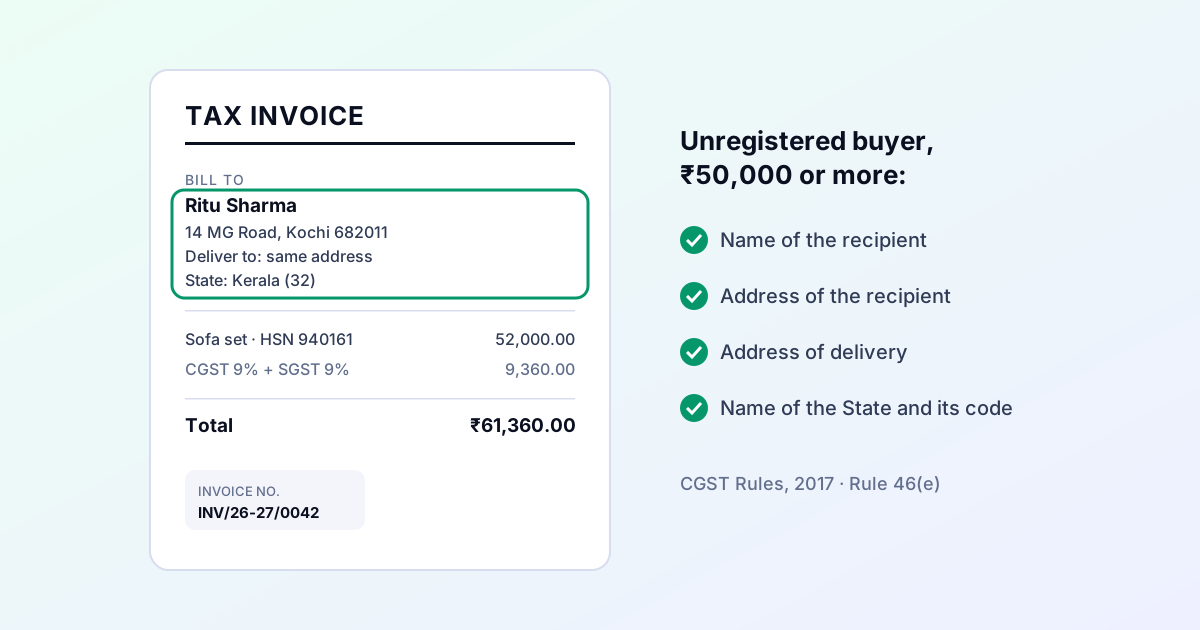
Most B2C bills are small, and for small bills to a buyer without a GSTIN the law asks for very little about the buyer. That changes at ₹50,000. A furniture shop, an electronics dealer, a jeweller or a contractor billing a household crosses that line every week, and the invoice then has to carry the buyer's details in full.
This guide sets out what the rule says, links to the official text, and shows how to check your own invoices — in Falcon, and by hand if you use something else. It is not tax advice; where a point needs judgement, ask your accountant.
The rule, in plain words
Section 31 of the CGST Act requires a registered supplier of taxable goods or services to issue a tax invoice. Rule 46 of the CGST Rules, 2017 lists what that invoice must contain. Three of its clauses are about the buyer, and which one applies depends on two questions.
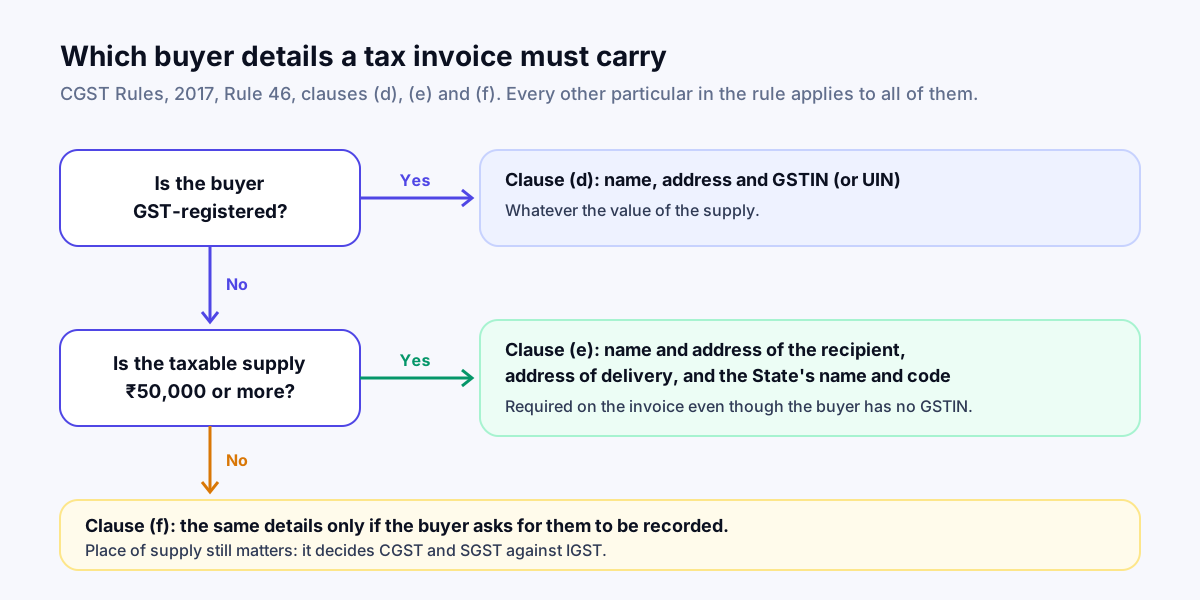
- Clause (d) — the buyer is registered: their name, address and GSTIN (or UIN), whatever the value.
- Clause (e) — the buyer is not registered and the value of the taxable supply is ₹50,000 or more: the buyer's name and address, the address of delivery, and the name of the State with its code.
- Clause (f) — the buyer is not registered and the value is below ₹50,000: the same details, but only if the buyer asks for them to be recorded.
Separate provisos change these details for exports and for some supplies made through e-commerce operators. This guide does not cover those.
Which "value" crosses ₹50,000?
The rule speaks of the value of the taxable supply. Under section 15 of the CGST Act the value of a supply is the transaction value, and it does not include the GST charged on that supply. So the threshold is generally read against the taxable value before tax, not the invoice total. A sale of ₹46,000 plus 18% GST comes to ₹54,280 on the bill but is a ₹46,000 supply. If your situation is unusual — several supplies on one invoice, discounts after the sale — ask your accountant how to value it.
The particulars every tax invoice needs anyway
Clause (e) adds to the list; it does not replace it. Whoever the buyer is, Rule 46 also asks for, among other things:
| Clause | What it asks for |
|---|---|
| (a) | Your name, address and GSTIN |
| (b) | A consecutive serial number of up to 16 characters, unique for the financial year |
| (c) | The date of issue |
| (g), (h), (i) | The HSN code, a description, and the quantity with its unit |
| (j), (k) | The total value and the taxable value after any discount |
| (l), (m) | The rate and the amount of each tax |
| (n) | The place of supply with the State's name, for an inter-State supply |
| (o) | The delivery address, where it differs from the place of supply |
| (p) | Whether tax is payable on reverse charge |
| (q) | Your signature or digital signature |
How many HSN digits
Rule 46 lets the government notify how many digits of the HSN code must be printed. Notification No. 78/2020–Central Tax, in force from 1 April 2021, sets it by your aggregate turnover in the previous financial year: 4 digits up to ₹5 crore, 6 digits above ₹5 crore. It also lets a business with turnover up to ₹5 crore leave the HSN code off invoices to unregistered buyers.
How to check an invoice by hand
For any B2C invoice where the taxable value is ₹50,000 or more:
- Is the buyer's name printed — a person's or a business's, not "Cash customer"?
- Is there a full address, not just a city?
- Is the delivery address there? If it is the same as the billing address, say so.
- Are the State's name and code printed (for example, Kerala, 32)?
- Does the place of supply agree with where the goods were delivered or the service received — and therefore with CGST and SGST on an intra-State sale, or IGST on an inter-State one?
- Do the other particulars in the table above appear, including an HSN code with the right number of digits?
If any of these is missing on an invoice already issued, talk to your accountant about how to correct it. A finalised invoice should not be edited quietly after the fact.
How Falcon checks it for you
Falcon applies the buyer check when you try to finalise a tax invoice — the step that gives it a number. A draft stays a draft, with no number, until the problems are fixed.
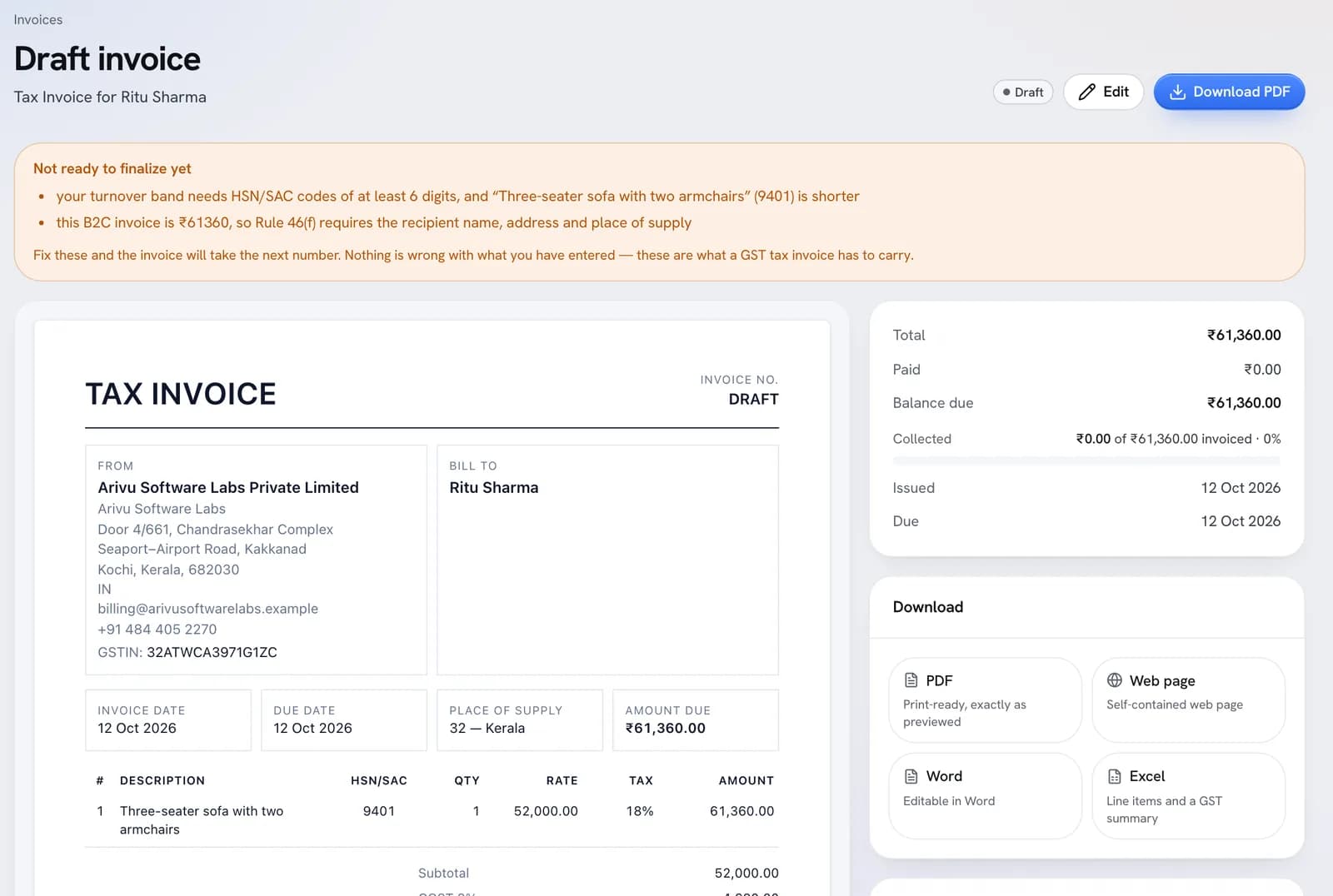
What it checks before it will number a GST tax invoice:
- Your GSTIN is present and passes its check digit, and your business State is set.
- The place of supply is set and is a valid State code.
- Every line has an HSN or SAC code of 4, 6 or 8 digits, and at least as many digits as your turnover band requires.
- A registered buyer has a GSTIN, and it passes its check digit.
- An unregistered buyer on an invoice of ₹50,000 or more has a name and at least one address line, billing or shipping.
It also refuses a numbering format that would produce an invoice number longer than 16 characters, and a bill of supply (no tax charged) is not held to these checks.
To fix the example above, open the customer under Sell → Customers, add the billing address — and a shipping address if the goods went somewhere else — and come back to the draft. The list shortens as each problem is fixed, and Finalize invoice gives it the next number.
Where Falcon is stricter, and where it falls short
We would rather you knew both.
Stricter than the rule:
- Falcon compares the taxable value, before GST, with ₹50,000, as the rule reads. A ₹46,000 sale with ₹8,280 of tax is not stopped; a ₹52,000 sale is, whatever its tax.
- It asks for an HSN code on every line, including on B2C invoices where a business under ₹5 crore may leave it out.
Short of the rule, so check these yourself:
- It accepts either a billing or a shipping address. It does not separately check that the delivery address is recorded when it differs from the billing address.
- The turnover band that decides between 4 and 6 HSN digits is a setting you choose in Settings → Business profile. If you have not chosen it, Falcon asks for 4 digits; if your turnover last year was above ₹5 crore, choose the higher band so it asks for 6.
- It does not check the signature, the e-invoice QR code, or that the place of supply is right — only that it is a real State.
- The screenshot above was taken before 12 October 2026, when the message still cited "Rule 46(f)". It now cites clause (e), the clause that applies; clause (f) is the one for smaller supplies on request.
Nothing in Falcon files anything with the GST portal or the e-invoice system on your behalf. The GST page explains what it prepares and what it leaves to you.
The sources
Read the rule itself rather than taking our word for it:
- Rule 46, CGST Rules, 2017 — tax invoice, on the CBIC tax information portal.
- Notification No. 78/2020–Central Tax, 15 October 2020 — HSN digits on tax invoices, on the GST Council website.
- Valuation in GST — the GST Council's flyer on section 15 and the value of a supply.
Rules change by notification. This guide reflects them as we read them on the date above; if a later notification changes a clause, the official text wins.